2016年5月25日 星期三

Oracle Client for SQL Server

Oracle Client for SQL Server
from my MSDN blog - May 25, 2016

Oracle ClientSupport Windows versionDocument / Download
Oracle 12c for Microsoft Windows x64 (64-Bit)•Windows Server 2008 x64 and Windows Server 2008 R2 x64 - Standard, Enterprise, Datacenter, Web, and Foundation editions.
•Windows 7 x64 - Professional, Enterprise, and Ultimate editions •Windows 8 x64 and Windows 8.1 x64 - Pro and Enterprise editions •Windows Server 2012 x64 and Windows Server 2012 R2 x64 - Standard, Datacenter, Essentials, and Foundation editions
Client Quick Installation Guide 12c Release 1 (12.1) for Microsoft Windows x64 (64-Bit) http://docs.oracle.com/database/121/NXCQI/toc.htmOracle Database 12c Release 1 (12.1.0.2.0) http://www.oracle.com/technetwork/database/enterprise-edition/downloads/database12c-win64-download-2297732.html
Oracle 11g R2 for Microsoft Windows x64 (64-Bit)•Windows Server 2003 - all x64 editions •Windows Server 2003 R2 - all x64 editions •Windows XP Professional x64 •Windows Vista x64 - Business, Enterprise, and Ultimate editions •Windows Server 2008 x64 - Standard, Enterprise, Datacenter, and Web editions. •Windows Server 2008 R2 x64 - Standard, Enterprise, Datacenter, Web, and Foundation editions. •Windows 7 x64 - Professional, Enterprise, and Ultimate editions •Windows 8 x64 - Pro and Enterprise editions •Windows 8.1 x64 - Pro and Enterprise editions •Windows Server 2012 x64 and Windows Server 2012 R2 x64 - Standard, Datacenter, Essentials, and Foundation editionsClient Quick Installation Guide 11g Release 2 (11.2) for Microsoft Windows x64 (64-Bit) http://docs.oracle.com/cd/E11882_01/install.112/e49700/toc.htmOracle Database 11g Release 2 (11.2.0.1.0) http://www.oracle.com/technetwork/database/enterprise-edition/downloads/112010-win64soft-094461.html
Oracle 10g R2 for Microsoft Windows x64 (64-Bit)•Windows Server 2003, Standard x64 Edition •Windows Server 2003, Enterprise x64 Edition •Windows Server 2003, Datacenter x64 Edition •Windows XP Professional x64 Edition •Windows Vista x64, Service Pack 1 - Business, Enterprise, and Ultimate editions •Windows Server 2008 x64 - Standard, Enterprise, Datacenter, Web, Standard without Hyper-V, Enterprise without Hyper-V, and Datacenter without Hyper-V editions The specific operating system components that are not supported are Windows Server 2008 x64 Hyper-V and Server Core.Database Client Installation Guide for Microsoft Windows (x64) http://docs.oracle.com/cd/B19306_01/install.102/b15684/toc.htm


2014年7月24日 星期四

SQL Server and SQL Server Agent Service Account(Startup Account) and Permissions (SQL Server與SQL Server Agent 服務帳戶(啟動帳戶)與權限)

SQL Server and SQL Server Agent Service Account(Startup Account) and Permissions
from my MSDN blog - July 24, 2014

SQL Server與SQL Server Agent 服務帳戶(啟動帳戶)與權限

可設定的種類

1.Domain User Account (使用一個網域使用者帳戶)
2.Local User Account (使用一個本機使用者帳戶)
3.Local Service Account (NT AUTHORITY\LOCAL SERVICE) 本機服務帳戶
4.Network Service Account (NT AUTHORITY\NETWORK SERVICE) 本機網路帳戶
5.Local System Account (NT AUTHORITY\SYSTEM) 本機系統帳戶

6.Virtual Accounts (start from Windows 7 and Windows Server 2008 R2)

NT SERVICE\ <SERVICENAME>

ServiceVirtual Account Name
Default instance of the Database Engine serviceNT SERVICE\MSSQLSERVER
SQL Server Agent service on the default instance of SQL ServerNT SERVICE\SQLSERVERAGENT
SQL Server Analysis service on the default instance of SQL ServerNT SERVICE\MSSQLServerOLAPService
SQL Server Reporting service on the default instance of SQL ServerNT SERVICE\ReportServer

7.Managed Service Accounts (start from Windows 7 and Windows Server 2008 R2)

Configure Windows Service Accounts and Permissions
https://msdn.microsoft.com/en-us/library/ms143504.aspx


Q & A

1.Does service account need sysadmin role?

[SQL Server(Database Engine)]
沒有文件說明一定需要sysadmin role
no document found saying No or Yes explicitly about if sql service account need to be a member of sysdamin role
(1)SQL 2005,service account is always granted with sysadmin by default (e.g. if we pick Local System as our service account, then we would have NT Authority/System having sysadmin in the SQL instance).
How to change the SQL Server or SQL Server Agent service account without using SQL Enterprise Manager in SQL Server 2000 or SQL Server Configuration Manager in SQL Server 2005
https://support.microsoft.com/kb/283811
Base on KB283811 for SQL 2005, When changing new SQL service Account, sysadmin role is a must

(2)SQL 2008,in Windows 2008 R2, Virtual Accounts(SQL Server Per-service SID)=NT SERVICE\<SERVICENAME>is always granted with sysadmin by default
Configure Windows Service Accounts and Permissions
https://msdn.microsoft.com/en-us/library/ms143504.aspx

基於以上文件,建議將SQL Server service accoount(startup account)加入sysadmin role


[SQL Server Agent]
雖然SQL Server Agent service的啟動帳戶不是sysadmin role也能啟動SQL Server Agent,但可能會限制某些功能。

(1)必須是sysadmin role
From Books Online and Training kit 70-462
The SQL Server Agent service startup account must be a member of the SQL Server sysadmin fixed server role, and if multiserver job processing is used, the account must also be a member of the msdb database role TargetServersRole on the master server.
Set the Service Startup Account for SQL Server Agent (SQL Server Configuration Manager)
https://msdn.microsoft.com/en-us/library/ms186264.aspx

From Training kit 70-462
(2)The account you assign for the SQL Server Agent service during installation is added automatically to the sysadmin fixed server role during installation.
PS.但是經測試SQL 2008 R2安裝過程時所指定一個local or domain user account也不會自動加入sysadmin role

(3)If you modify the account used by the SQL Server Agent service at a later point, SQL Server Configuration Manager does not automatically add the account to sysadmin role.
PS.透過SQL Server Configuration Manager修改啟動帳戶,只會給予需要的權限,不會自動加sysadmin role


2.Does service account need Windows Administrator Permission?(local Administrators Group member)

[SQL Server(Database Engine)]
(1)不需要是Administrators group member
(2)視需求選擇其中一種account
Domain User Account
Local User Account
Local Service Account(NT AUTHORITY\LOCAL SERVICE)
Network Service Account(NT AUTHORITY\NETWORK SERVICE)
Local System Account(NT AUTHORITY\SYSTEM)

Windows 7 and Windows Server 2008 R2 have two new types of service accounts called managed service accounts (MSA) and virtual accounts.
Virtual Accounts
Managed Service Accounts

Configure Windows Service Accounts and Permissions
https://msdn.microsoft.com/en-us/library/ms143504.aspx


[SQL Server Agent]
(1)Beginning with SQL 2005, 不需要是Administrators Group member
Beginning with SQL Server 2005, SQL Server Agent no longer requires that the service startup account be a member of the Microsoft Administrators group.
However, there are some restrictions associated with using a non-administrative account for the SQL Server Agent service. For more information, see Service Account Types Supported for SQL Server Agent.
https://msdn.microsoft.com/en-us/library/ms345380(v=sql.105).aspx

(2)如果是domain account可能需要以下權限
From Training kit 70-462
When choosing to use a domain-based security account, ensure that the account has the following permissions:
■ The logon as a service right. You assign this right by using Group Policy.
■ Membership of the Pre-Windows 2000 Compatible Access security group at the domain level. If you do not add the domain-based security account used for the SQL Server Agent service to this group, any jobs owned by domain users who are not members of the local Administrators group on the host computer will fail.


PS.

1.Default provisioning login after SQL Server setup finish

2.Default provisioning windows groups


2014年6月18日 星期三

Always On Availability Groups learning resources (Always On Availability Groups學習資源與文件)

Always On Availability Groups learning resources
Always On Availability Groups學習資源與文件
from my MSDN blog - June 18, 2014

Overview of Always On Availability Groups (SQL Server)
http://msdn.microsoft.com/en-us/library/ff877884.aspx
Prerequisites, Restrictions, and Recommendations for Always On Availability Groups (SQL Server)
http://msdn.microsoft.com/en-us/library/ff878487.aspx

SQL Always On Team Blog
http://blogs.msdn.com/b/sqlalwayson/
SQL Server Customer Advisory Team
http://blogs.msdn.com/b/sqlcat/

MSDN Blogs  >  Brad Chen's SQL Server Blog   >  All Tags  >  alwayson
http://blogs.msdn.com/b/bradchen/archive/tags/alwayson/

Always On Architecture Guide: Building a High Availability and Disaster Recovery Solution by Using Failover Cluster Instances and Availability Groups
http://msdn.microsoft.com/en-us/library/jj215886.aspx
[Building a High Availability and Disaster Recovery Solution using AlwaysOn Availability Groups.docx]

SQL Server 2012 AlwaysOn: Multisite Failover Cluster Instance
http://msdn.microsoft.com/en-us/library/hh750283.aspx
[SQLServer2012_MultisiteFailoverCluster.docx]

SQL Server High Availability and Disaster Recovery for SAP Deployment at QR: A Technical Case Study
http://download.microsoft.com/download/d/9/4/d948f981-926e-40fa-a026-5bfcf076d9b9/SQLServer_HADR_QR.docx

How to create a failover cluster 如何新增一個容錯移轉叢集

How to create a failover cluster

如何新增一個容錯移轉叢集


1.In the Failover Cluster Manager snap-in, confirm that Failover Cluster Manager is selected and then, under Management, click Create a Cluster.

2.Follow the instructions in the wizard to specify:

  • The servers to include in the cluster.
  • The name of the cluster.
  • Any IP address information that is not automatically supplied by your DHCP settings.


3.After the wizard runs and the Summary page appears, if you want to view a report of the tasks that the wizard performed, click View Report.

To view the report after you close the wizard, see the following folder, where SystemRoot is the location of the operating system (for example, C:\Windows):

SystemRoot\Cluster\Reports\

[Reference]

Create a New Failover Cluster

https://technet.microsoft.com/en-us/library/cc755129.aspx


2014年3月12日 星期三

Query SQL Server backup history and restore history records 查詢SQL Server資料庫備份與還原紀錄

Query SQL Server backup history and restore history records
查詢SQL Server資料庫備份與還原紀錄
from my MSDN blog - March 12, 2014

SQL Server備份還原紀錄

1.使用以下TSQL語法查詢備份檔紀錄

 SELECT 
 bs.backup_set_id,
 bs.database_name,
 bs.backup_start_date,
 bs.backup_finish_date,
 CAST(CAST(bs.backup_size/1000000 AS INT) AS VARCHAR(14)) + ' ' + 'MB' AS [Size],
 CAST(DATEDIFF(second, bs.backup_start_date,
 bs.backup_finish_date) AS VARCHAR(4)) + ' ' + 'Seconds' [TimeTaken],
 CASE bs.[type]
 WHEN 'D' THEN 'Full Backup'
 WHEN 'I' THEN 'Differential Backup'
 WHEN 'L' THEN 'TLog Backup'
 WHEN 'F' THEN 'File or filegroup'
 WHEN 'G' THEN 'Differential file'
 WHEN 'P' THEN 'Partial'
 WHEN 'Q' THEN 'Differential Partial'
 END AS BackupType,
 bmf.physical_device_name,
 CAST(bs.first_lsn AS VARCHAR(50)) AS first_lsn,
 CAST(bs.last_lsn AS VARCHAR(50)) AS last_lsn,
 bs.server_name,
 bs.recovery_model
 From msdb.dbo.backupset bs
 INNER JOIN msdb.dbo.backupmediafamily bmf 
 ON bs.media_set_id = bmf.media_set_id
 ORDER BY bs.server_name,bs.database_name,bs.backup_start_date;
 GO


透過SERVER_NAME欄位,可以判斷該備份檔是否是在這台SQL Server上執行的備份

如果SERVER_NAME欄位顯示別台SQL Server主機名稱,表示這個備份檔是從別台SQL Server複製過來並且在這台執行過RESTORE


2.使用以下TSQL查詢還原紀錄

 SELECT rs.[restore_history_id]
 ,rs.[restore_date]
 ,rs.[destination_database_name]
 ,bmf.physical_device_name
 ,rs.[user_name]
 ,rs.[backup_set_id]
 ,CASE rs.[restore_type]
 WHEN 'D' THEN 'Database'
 WHEN 'I' THEN 'Differential'
 WHEN 'L' THEN 'Log'
 WHEN 'F' THEN 'File'
 WHEN 'G' THEN 'Filegroup'
 WHEN 'V' THEN 'Verifyonlyl'
 END AS RestoreType
 ,rs.[replace]
 ,rs.[recovery]
 ,rs.[restart]
 ,rs.[stop_at]
 ,rs.[device_count]
 ,rs.[stop_at_mark_name]
 ,rs.[stop_before]
 FROM [msdb].[dbo].[restorehistory] rs
 inner join [msdb].[dbo].[backupset] bs
 on rs.backup_set_id = bs.backup_set_id
 INNER JOIN msdb.dbo.backupmediafamily bmf 
 ON bs.media_set_id = bmf.media_set_id
 GO

PS.RESTORE操作會寫入backupset與backupmediafamily資料表,紀錄還原所使用的備份檔資訊


2013年9月8日 星期日

Setting Up SQL Server 2008 R2 Database Mirroring in a Workgroup 在Workgoup環境設定SQL Server資料庫鏡像

Setting Up SQL Server 2008 R2 Database Mirroring in a Workgroup
在Workgoup環境設定SQL Server資料庫鏡像
from my MSDN blog - September 8, 2013

1.Verify SQL Server service account and configure SQL Server Login for Database Mirroring

(1)SQL Server service account

Principal Server SQL Server service account is local account name "SQLServer"

Mirroring Server SQL Server service account is local account name "SQLService"

(2)create a local account "SQLservice" on Principal Server

create a login for local account "SQLservice"

(3)create a local account "SQLService" on Mirroring Server

create a login for local account "SQLService"

2.Prepare Mirroring Database

3.Setup Database Mirroring

此步驟需要輸入SQL Server的啟動帳戶,設定精靈會是需要建立Login並在端點授予CONNECT權限。

When creating an endpoint, the Configure Database Mirroring Security Wizard always uses Windows Authentication. Before you can use the wizard with certificate-based authentication, the mirroring endpoint must already have been configured to use certificates on each of the server instances. Also, all the fields of the wizard’s Service Accounts dialog box must remain empty. For information about creating a database mirroring endpoint to use certificates, see CREATE ENDPOINT (Transact-SQL).

SQL DBM 只支援Windows驗證與憑證驗證,若採用Windows驗證,此步驟需輸入SQL Server的服務帳號,SQL DBM鏡像使用SQL Server服務帳號連線到鏡像夥伴來同步資料

此帳號可以是本地Windows帳號,輸入後精靈會在各個角色的SQL instance建立Login並授予對上一個步驟建立的Endpoint端點有CONNECT權限。

如果沒有事先建立login或沒有事先授予端點的CONNECT權限,則輸入對方的SQL Server服務啟動帳戶(SQL Server Startup Account)

Principal下方輸入Mirror的SQL Server啟動帳戶

Mirror下方輸入Principal的SQL Server啟動帳戶

(2)設定成功後,不要啟動鏡像(Do not start Mirroring)。

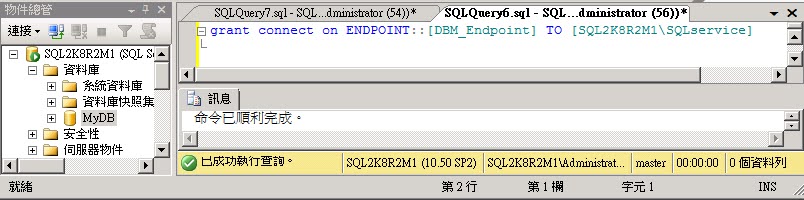
(3)Grant Connect permission to Mirroring service account "SQLservice"

GRANT CONNECT ON ENDPOINT::[DBM_Endpoint] TO [SQL2K8R2M1\SQLservice] 
GO

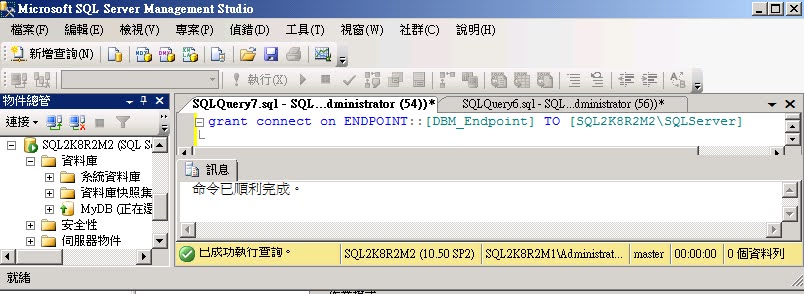
(4)Grant Connect permission to Principal service account "SQLService"

GRANT CONNECT ON ENDPOINT::[DBM_Endpoint] TO [SQL2K8R2M2\SQLservice] 
GO

(5)Start Mirroring

(6)click [Yes]

(7)finish

4.Network Traffic

Configure the Windows Firewall to Allow SQL Server Access
https://msdn.microsoft.com/en-us/library/cc646023.aspx

ScenarioPortComments
Database MirroringAdministrator chosen port. To determine the port, execute the following query:  SELECT name, protocol_desc, port, state_desc FROM sys.tcp_endpoints  WHERE type_desc = 'DATABASE_MIRRORING'There is no default port for database mirroring however Books Online examples use TCP port 7022. It is very important to avoid interrupting an in-use mirroring endpoint, especially in high-safety mode with automatic failover. Your firewall configuration must avoid breaking quorum. For more information, see Specify a Server Network Address (Database Mirroring).

UDP port 137 and 138, and TCP port 139 possible need for NetBIOS name resolution.


資料治理實施

資料治理實施