2021年1月15日 星期五

2020年8月25日 星期二
version or edition consideration when SQL Server migrate or upgrade
version or edition consideration when SQL Server migrate or upgrade
如果SQL Server 2000並採用資料庫備份還原來移轉Migration,步驟如下
1.restore to SQL 2008 R2
2.changet db's compatibility level from 80 to 100
3.take a backup
4.restore the backup on SQL Servre 2022
如果採用原機升級 Upgrade in-place
Supported version & edition upgrades (SQL Server 2019)
Upgrades from Earlier Versions to SQL Server 2019 (15.x)
SQL Server 2019 (15.x) supports upgrade from the following versions of SQL Server:
- SQL Server 2012 (11.x) SP4 or later
- SQL Server 2014 (12.x) SP3 or later
- SQL Server 2016 (13.x) SP2 or later
- SQL Server 2017 (14.x)
Supported version & edition upgrades (SQL Server 2017)
SQL Server 2017 (14.x) supports upgrade from the following versions of SQL Server:
- SQL Server 2008 SP4 or later
- SQL Server 2008 R2 SP3 or later
- SQL Server 2012 SP2 or later
- SQL Server 2014 or later
- SQL Server 2016 or later
Supported version & edition upgrades (SQL Server 2016)
SQL Server 2016 supports upgrade from the following versions of SQL Server:
- SQL Server 2008 SP4 or later
- SQL Server 2008 R2 SP3 or later
- SQL Server 2012 (11.x) SP2 or later
- SQL Server 2014 (12.x) or later
2019年11月27日 星期三
使用 SQL Server Profiler 檢視和分析追蹤
使用 SQL Server Profiler 檢視和分析追蹤
測量單位
使用
1.啟動SQL Server Profiler

2.新增一個追蹤New Trace

3.登入欲追蹤的SQL Server

4.追蹤屬性設定視窗
有兩個頁籤,預設顯示一般設定(General)頁籤

5.預設的追蹤事件
切換到事件選取(Events Selection)頁籤,可自訂事件(勾選需要的事件)

6.使用追蹤範本
也可在一般設定(General)頁籤,依據不同追蹤目的可選擇不同的範本,不同的範本有定義不同的追蹤事件Events,選取後Event Selection頁籤的事件就會依據所選的範本而變動

7.若要自訂追蹤事件
在事件選取(Events Selection)頁籤,可勾選Show all events顯示所有事件,才會顯示所有事件

部分不常用追蹤欄位預設是隱藏的,可勾選Show all columns,才會顯示所有可用欄位

展開前方的加號(+),就可以勾選該類別的各別事件與特定的欄位

若需要過濾事件,可以點選Column filters,再去設定特定欄位的過濾條件
例如預設已設定不會收集到SQL Server Profiler本身所執行的SQL Query。

8.設定追蹤儲存至實體檔案
若需要在追蹤時就儲存實體檔案,則可在一般設定(General)頁籤
(1)勾選Save to file,並指定檔案位置與檔名
(2)建議設定追蹤檔大小上限,在set maximum file size輸入350
(3)預設啟用檔案換用Enable file rollover,建議保留不動
(4)預設不啟用伺服器處理追蹤資料,建議保留不動。
若啟用時,因為當SQL Server負載大極度忙碌時,也不會略過追蹤,可能會造成性能的影響
"Server processes trace data" tells the service running the trace to process the trace data and not the client application. With this option selected no trace data will ever be skipped even if the server is extremely busy, but note that your server performance may be affected if this happens

9.設定追蹤儲存至資料表
不建議啟用,此動作可在收集完成後再手動進行匯入資料表。
若勾選了,則要選擇連線到目的地SQL Servre與資料表。

10.設定自動停止追蹤
若有需要自動停止追蹤,則勾選Enable trace stop time,然後指定一個停止日期與時間之後,當追蹤開始收集,就會自動在指定的時間自動停止。
Check the "Enable trace stop time" checkbox and give the time at which you want to stop track, SQL Server will automatically stop trace on that time.

11.開始收集追蹤
按下 Run 就會開始執行收集

12.開始收集時的畫面如下
可透過上方的工具列,按下暫停可暫停追蹤,但下停止可以停止追蹤。

13.另存追蹤
按下File>Save As>Trace File... 可將目前顯是的追蹤內容,儲存到實體檔案
按下File>Save As>Trace Table... 可將目前顯是的追蹤內容,儲存到資料表

分析案例
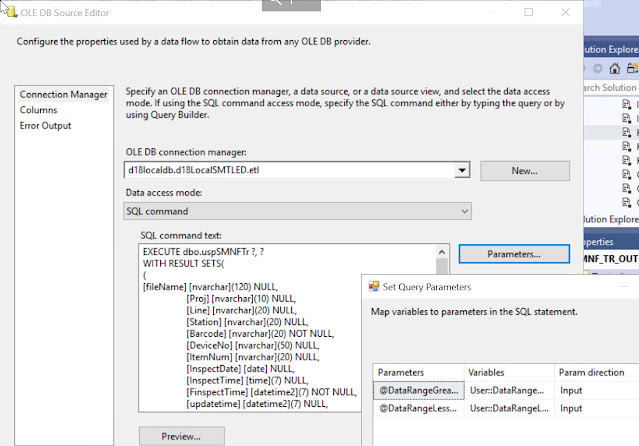
當SSIS使用的OLE DB Source - SQL Command with Parameter時,但如果傳入的參數值是寫死在SQL Command,Profiler才錄得到
參考:
使用 SQL Server Profiler 檢視和分析追蹤
https://docs.microsoft.com/zh-tw/sql/tools/sql-server-profiler/view-and-analyze-traces-with-sql-server-profiler?view=sql-server-ver15
測量單位
- Duration: SQL Server Profiler 顯示 Duration column in milliseconds(10-3 of a second) by default. Trace儲存到檔案或資料表時 in microseconds(10-6 of a second)
- CPU: in milliseconds(10-3 of a second)
使用
1.啟動SQL Server Profiler

2.新增一個追蹤New Trace

3.登入欲追蹤的SQL Server

4.追蹤屬性設定視窗
有兩個頁籤,預設顯示一般設定(General)頁籤

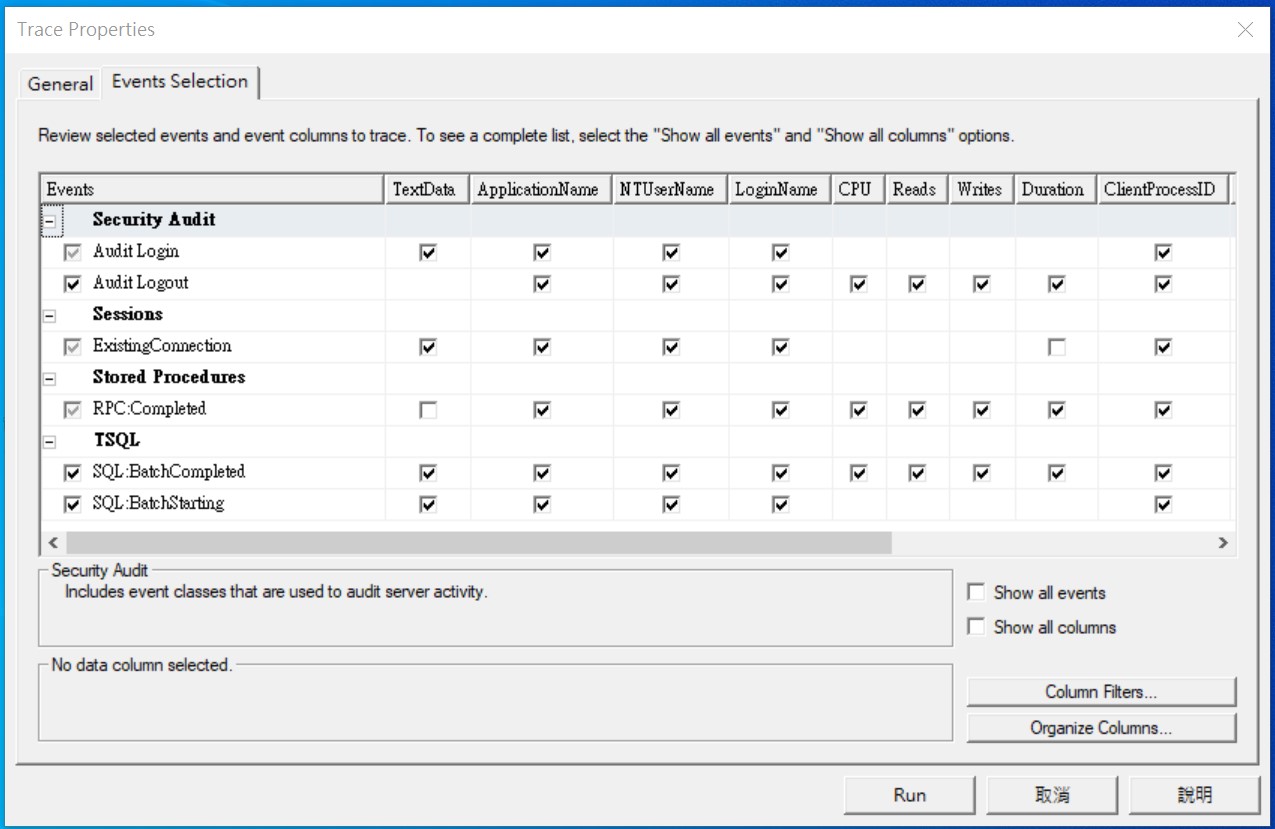
5.預設的追蹤事件
切換到事件選取(Events Selection)頁籤,可自訂事件(勾選需要的事件)
6.使用追蹤範本
也可在一般設定(General)頁籤,依據不同追蹤目的可選擇不同的範本,不同的範本有定義不同的追蹤事件Events,選取後Event Selection頁籤的事件就會依據所選的範本而變動

7.若要自訂追蹤事件
在事件選取(Events Selection)頁籤,可勾選Show all events顯示所有事件,才會顯示所有事件

部分不常用追蹤欄位預設是隱藏的,可勾選Show all columns,才會顯示所有可用欄位

展開前方的加號(+),就可以勾選該類別的各別事件與特定的欄位

若需要過濾事件,可以點選Column filters,再去設定特定欄位的過濾條件
例如預設已設定不會收集到SQL Server Profiler本身所執行的SQL Query。

8.設定追蹤儲存至實體檔案
若需要在追蹤時就儲存實體檔案,則可在一般設定(General)頁籤
(1)勾選Save to file,並指定檔案位置與檔名
(2)建議設定追蹤檔大小上限,在set maximum file size輸入350
(3)預設啟用檔案換用Enable file rollover,建議保留不動
(4)預設不啟用伺服器處理追蹤資料,建議保留不動。
若啟用時,因為當SQL Server負載大極度忙碌時,也不會略過追蹤,可能會造成性能的影響
"Server processes trace data" tells the service running the trace to process the trace data and not the client application. With this option selected no trace data will ever be skipped even if the server is extremely busy, but note that your server performance may be affected if this happens

9.設定追蹤儲存至資料表
不建議啟用,此動作可在收集完成後再手動進行匯入資料表。
若勾選了,則要選擇連線到目的地SQL Servre與資料表。

10.設定自動停止追蹤
若有需要自動停止追蹤,則勾選Enable trace stop time,然後指定一個停止日期與時間之後,當追蹤開始收集,就會自動在指定的時間自動停止。
Check the "Enable trace stop time" checkbox and give the time at which you want to stop track, SQL Server will automatically stop trace on that time.

11.開始收集追蹤
按下 Run 就會開始執行收集

12.開始收集時的畫面如下
可透過上方的工具列,按下暫停可暫停追蹤,但下停止可以停止追蹤。

13.另存追蹤
按下File>Save As>Trace File... 可將目前顯是的追蹤內容,儲存到實體檔案
按下File>Save As>Trace Table... 可將目前顯是的追蹤內容,儲存到資料表

分析案例
如果是SSIS Package資料流data flow的OLE DB Source - SQL Command with Parameter,則錄不到傳入的參數值,RPC:: Completed只會出現@P1, @P2
既使有選擇Stored Procedure與TSQL所有Event,仍然找不到傳入的參數值

當SSIS使用的OLE DB Source - SQL Command with Parameter時,但如果傳入的參數值是寫死在SQL Command,Profiler才錄得到

參考:
使用 SQL Server Profiler 檢視和分析追蹤
https://docs.microsoft.com/zh-tw/sql/tools/sql-server-profiler/view-and-analyze-traces-with-sql-server-profiler?view=sql-server-ver15
SQL Server Profiler
SQL Trace
2019年7月28日 星期日
SQL Server 2017 Machine Learning
1.啟動 SQL Server Launchpad service


2.檢查並啟用 external scripts enabled
預設 SQL Server的external scripts enabled是停用的

執行以下語法啟用 external scripts enabled
EXEC sp_configure 'external scripts enabled', 1
RECONFIGURE WITH OVERRIDE

如果檢查run_value不是1,則需要重新啟動SQL Server讓設定生效

若正常啟用,run_value是1

3.請確認有 Python
執行Python Script檢查Python版本

若出現錯誤Msg 39011,可能是SQL Server Launchpad service服務沒有啟動,
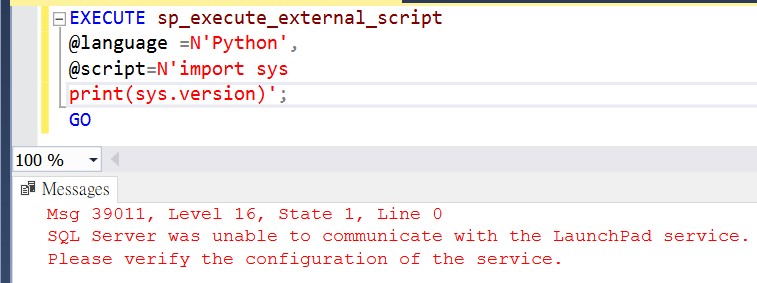
或是需要重新啟動一次

若出現錯誤,可能是找不到Python
Msg 39021, Level 16, State 1, Line 0
Unable to launch runtime for 'Python' script. Please check the configuration of the 'Python' runtime.
Msg 39019, Level 16, State 2, Line 0
An external script error occurred:
Unable to launch the runtime. ErrorCode 0x80070490: 1168(元素找不到。).


執行用Python Script Hello World

若用R語言Hello World

5.確認revoscalepy可供使用
下列指令碼會示範如何擷取包含在 revoscalepy 內建的範例.xdf 資料檔案。

6.查看預先安裝的Python 套件清單
Microsoft 預先安裝在SQL Server執行個體的機器學習服務 Python 套件

Revoscalepy
維基百科
revoscalepy是由Microsoft創建的Python中的機器學習包。它作為Microsoft SQL Server 2017和Machine Learning Server 9.2.0及更高版本中的機器學習服務的一部分提供。[1]
該軟件包包含用於創建線性模型,邏輯回歸,隨機森林,決策樹和提升決策樹的功能,以及用於檢查數據的一些摘要功能。[2] 其他機器學習算法,如神經網絡,是在microsoftm中提供的,這是一個單獨的軟件包,它是MicrosoftML的Python版本。[3]
revoscalepy還包含用於在不同計算環境中運行機器學習算法的函數,包括SQL Server,Apache Spark和Hadoop。[2]
Next Step:
Quickstart: Create, train, and use a Python model with stored procedures in SQL Server
https://docs.microsoft.com/en-us/sql/advanced-analytics/tutorials/quickstart-python-train-score-in-tsql?view=sql-server-2017
Use Python with revoscalepy to create a model that runs remotely on SQL Server
https://docs.microsoft.com/en-us/sql/advanced-analytics/tutorials/use-python-revoscalepy-to-create-model?view=sql-server-2017
Reference:
SQL Server Machine Learning tutorials in R and Python
https://docs.microsoft.com/en-us/sql/advanced-analytics/tutorials/machine-learning-services-tutorials?view=sql-server-2017
Quickstart: Verify Python exists in SQL Server
https://docs.microsoft.com/en-us/sql/advanced-analytics/tutorials/quickstart-python-verify?view=sql-server-2017
revoscalepy (Python module in SQL Server)
https://docs.microsoft.com/zh-tw/sql/advanced-analytics/python/ref-py-revoscalepy?view=sql-server-2017
訂閱:
文章 (Atom)
-
SQL Server Enterprise 與 Standard 基本差異比較如下 : SQL Server Enterprise Edition SQL Server Standard Edition ...
-
Oracle version support matrix Oracle Release 19 Oracle Database Client Software Requirements https://docs.oracle.com/en/database/oracle/orac...
-
 1.安裝了Oracle Client,就可以用Oracle Net Manager工具來設定TNS連線設定(Tnsnames.ora) Oracle Client 18.3 Installation 安裝Oracle Client 18.3 2.啟動Oracle Ne...

