SQL Server Database Mirroring 資料庫鏡像
2024年1月12日 星期五

2013年9月8日 星期日
Setting Up SQL Server 2008 R2 Database Mirroring in a Workgroup 在Workgoup環境設定SQL Server資料庫鏡像
Setting Up SQL Server 2008 R2 Database Mirroring in a Workgroup
在Workgoup環境設定SQL Server資料庫鏡像
from my MSDN blog - September 8, 2013


在Workgoup環境設定SQL Server資料庫鏡像
from my MSDN blog - September 8, 2013
1.Verify SQL Server service account and configure SQL Server Login for Database Mirroring
(1)SQL Server service account
Principal Server SQL Server service account is local account name "SQLServer"
Mirroring Server SQL Server service account is local account name "SQLService"

(2)create a local account "SQLservice" on Principal Server

create a login for local account "SQLservice"

(3)create a local account "SQLService" on Mirroring Server

create a login for local account "SQLService"

2.Prepare Mirroring Database
3.Setup Database Mirroring
此步驟需要輸入SQL Server的啟動帳戶,設定精靈會是需要建立Login並在端點授予CONNECT權限。
When creating an endpoint, the Configure Database Mirroring Security Wizard always uses Windows Authentication. Before you can use the wizard with certificate-based authentication, the mirroring endpoint must already have been configured to use certificates on each of the server instances. Also, all the fields of the wizard’s Service Accounts dialog box must remain empty. For information about creating a database mirroring endpoint to use certificates, see CREATE ENDPOINT (Transact-SQL).
SQL DBM 只支援Windows驗證與憑證驗證,若採用Windows驗證,此步驟需輸入SQL Server的服務帳號,SQL DBM鏡像使用SQL Server服務帳號連線到鏡像夥伴來同步資料
此帳號可以是本地Windows帳號,輸入後精靈會在各個角色的SQL instance建立Login並授予對上一個步驟建立的Endpoint端點有CONNECT權限。

如果沒有事先建立login或沒有事先授予端點的CONNECT權限,則輸入對方的SQL Server服務啟動帳戶(SQL Server Startup Account)
Principal下方輸入Mirror的SQL Server啟動帳戶
Mirror下方輸入Principal的SQL Server啟動帳戶

(2)設定成功後,不要啟動鏡像(Do not start Mirroring)。

(3)Grant Connect permission to Mirroring service account "SQLservice"
GRANT CONNECT ON ENDPOINT::[DBM_Endpoint] TO [SQL2K8R2M1\SQLservice]
GO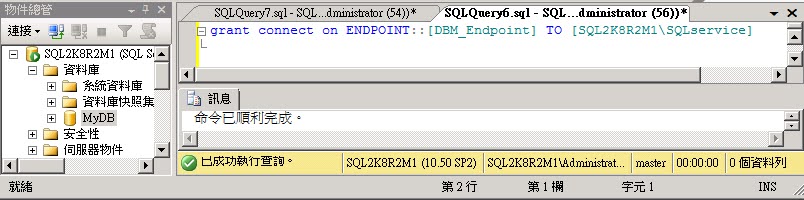
(4)Grant Connect permission to Principal service account "SQLService"
GRANT CONNECT ON ENDPOINT::[DBM_Endpoint] TO [SQL2K8R2M2\SQLservice]
GO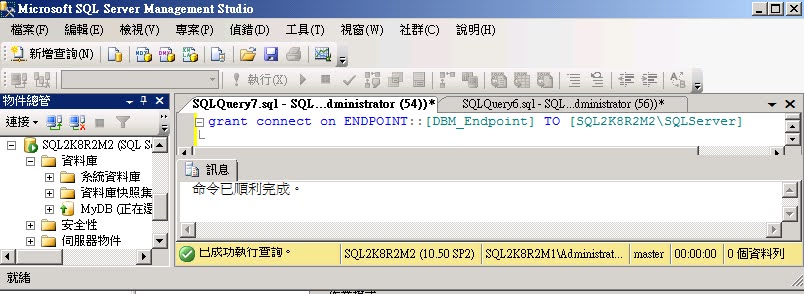
(5)Start Mirroring

(6)click [Yes]

(7)finish

4.Network Traffic
Configure the Windows Firewall to Allow SQL Server Access
https://msdn.microsoft.com/en-us/library/cc646023.aspx
| Scenario | Port | Comments |
| Database Mirroring | Administrator chosen port. To determine the port, execute the following query: SELECT name, protocol_desc, port, state_desc FROM sys.tcp_endpoints WHERE type_desc = 'DATABASE_MIRRORING' | There is no default port for database mirroring however Books Online examples use TCP port 7022. It is very important to avoid interrupting an in-use mirroring endpoint, especially in high-safety mode with automatic failover. Your firewall configuration must avoid breaking quorum. For more information, see Specify a Server Network Address (Database Mirroring). |
UDP port 137 and 138, and TCP port 139 possible need for NetBIOS name resolution.
2013年9月7日 星期六
Setting Up SQL Server Database Mirroring with Certificate step by step in a Workgroup 一步一步使用憑證設定SQL Server資料庫鏡像
Setting Up SQL Server Database Mirroring with Certificate step by step in a Workgroup
一步一步使用憑證設定SQL Server資料庫鏡像
SQL Server service accounts and Database Mirroring 資料庫鏡像服務帳戶
SQL Server service accounts and Database Mirroring
資料庫鏡像服務帳戶
from my MSDN blog - September 7, 2013
設定Database Mirroring時,指定的服務帳號是SQL Server的服務帳號(啟動帳號)


資料庫鏡像服務帳戶
from my MSDN blog - September 7, 2013
設定Database Mirroring時,指定的服務帳號是SQL Server的服務帳號(啟動帳號)
SQL DBM 只支援Windows驗證與憑證驗證,若採用Windows驗證,此步驟需輸入SQL Server的服務帳號,SQL DBM鏡像使用SQL Server服務帳號連線到鏡像夥伴來同步資料
此帳號可以是本地Windows帳號,輸入後精靈會在各個角色的SQL instance建立Login並授予對上一個步驟建立的Endpoint端點有CONNECT權限。
When using Windows Authentication, if the server instances use different accounts, specify the service accounts for SQL Server. These service accounts must all be domain accounts (in the same or trusted domains).
If all the server instances use the same domain account or use certificate-based authentication, leave the fields blank. Simply click Finish, and the wizard automatically configures the accounts based on the account of the current wizard.
如果Database Mirroring使用憑證設定,此步驟可以保留空白
如果主體與鏡像沒有已經建立好的Windows Login,則需要輸入對方的Windows帳號
例如:
1.若使用本地Windows帳號
A.如果每一台SQL Server主機上的本機Windows帳號名稱相同
Pricipal輸入 SQLDBM2\SQLDBM
Mirror輸入 SQLDBM1\SQLDBM
B.每一台SQL Server主機上的本機Windows帳號名稱不同
Pricipal輸入 SQLDBM2\SQLDBM2
Mirror輸入 SQLDBM1\SQLDBM1
2.若使用網域帳號
A.如果Windows帳號名稱相同
Pricipal: CONTOSO\SQLDBM,Mirror: CONTOSO\SQLDBM
B.兩台SQL上建立的Windows帳號名稱不同
Pricipal: CONTOSO\SQLDBM2,Mirror: CONTOSO\SQLDBM1
------------------------------------------------------------------------------------------------
1.Both of Principal and Mirroring SQL service accounts can be domain accounts (in the same or trusted domains)
2.Both of Principal and Mirroring SQL service accounts can be local accounts.
3.If principal SQL Server service account is a domain account and mirroring SQL Server service account is a local account, you may encounter this warning and error:
如果你在服務帳戶頁籤,輸入的Windows帳號名稱錯誤會找不到Windows帳號 (例如 主體應該輸入鏡像主機SQLDBM2上的Windows帳號,Pricipal應該輸入 SQLDBM2\SQLDBM ),會出現以下警告:


啟動鏡像則可能會出現以下錯誤:
The server network address "TCP://myserver.domain.domain.domain.com:5022" can not be reached or does not exist.
Check the network address name and that the ports for the local and remote endpoints are operational.
(Microsoft SQL Server, Error:1418)

From ERRORLOG
2013-09-08 00:27:18.13 Logon Database Mirroring login attempt failed with error: 'Connection handshake failed. An OS call failed: (8009030c) 0x8009030c(登入嘗試失敗). State 67.'. [CLIENT: fe80::3478:8ea7:fceb:bae5%11]
2013-09-08 00:27:18.14 spid32s Error: 1474, Severity: 16, State: 1.
2013-09-08 00:27:18.14 spid32s Database mirroring connection error 5 'Connection handshake failed. An OS call failed: (8009030c) 0x8009030c(登入嘗試失敗). State 67.' for 'TCP://MirrorServer:5022'.
2013-09-08 00:27:20.54 Logon Database Mirroring login attempt failed with error: 'Connection handshake failed. An OS call failed: (8009030c) 0x8009030c(登入嘗試失敗). State 67.'. [CLIENT: fe80::3478:8ea7:fceb:bae5%11]
2013-09-08 00:27:21.03 Logon Database Mirroring login attempt failed with error: 'Connection handshake failed. An OS call failed: (8009030c) 0x8009030c(登入嘗試失敗). State 67.'. [CLIENT: fe80::3478:8ea7:fceb:bae5%11]
2013-09-08 00:27:22.06 Logon Database Mirroring login attempt failed with error: 'Connection handshake failed. An OS call failed: (8009030c) 0x8009030c(登入嘗試失敗). State 67.'. [CLIENT: fe80::3478:8ea7:fceb:bae5%11]
2013-09-08 00:27:24.06 Logon Database Mirroring login attempt failed with error: 'Connection handshake failed. An OS call failed: (8009030c) 0x8009030c(登入嘗試失敗). State 67.'. [CLIENT: fe80::3478:8ea7:fceb:bae5%11]
2013-09-08 00:27:26.59 Logon Database Mirroring login attempt failed with error: 'Connection handshake failed. An OS call failed: (8009030c) 0x8009030c(登入嘗試失敗). State 67.'. [CLIENT: fe80::3478:8ea7:fceb:bae5%11]
2013-09-08 00:27:29.09 Logon Database Mirroring login attempt failed with error: 'Connection handshake failed. An OS call failed: (8009030c) 0x8009030c(登入嘗試失敗). State 67.'. [CLIENT: fe80::3478:8ea7:fceb:bae5%11]
2013-09-08 00:27:31.62 Logon Database Mirroring login attempt failed with error: 'Connection handshake failed. An OS call failed: (8009030c) 0x8009030c(登入嘗試失敗). State 67.'. [CLIENT: fe80::3478:8ea7:fceb:bae5%11]
2013-09-08 00:27:34.11 Logon Database Mirroring login attempt failed with error: 'Connection handshake failed. An OS call failed: (8009030c) 0x8009030c(登入嘗試失敗). State 67.'. [CLIENT: fe80::3478:8ea7:fceb:bae5%11]
2013-09-08 00:27:36.63 Logon Database Mirroring login attempt failed with error: 'Connection handshake failed. An OS call failed: (8009030c) 0x8009030c(登入嘗試失敗). State 67.'. [CLIENT: fe80::3478:8ea7:fceb:bae5%11]
2013-09-08 00:27:38.02 spid30s 錯誤: 1443,嚴重性: 16,狀態: 2。
2013-09-08 00:27:38.02 spid30s Database mirroring has been terminated for database 'MyDB'. This is an informational message only. No user action is required.
即使此時ping對方與telnet對方都沒有問題,還是可能會出現以上錯誤。
[RESOLUTION] 有3種解決方法
可能原因1.SQL Server的服務帳號(啟動帳號)仍是預設 NT SERVICE\MSSQLSERVER
2024-01-11 03:49:49.10 Logon Database Mirroring login attempt by user 'NT AUTHORITY\ANONYMOUS LOGON.' failed with error: 'Connection handshake failed. The login 'NT AUTHORITY\ANONYMOUS LOGON' does not have CONNECT permission on the endpoint. State 84.'. [CLIENT: 10.4.0.4]
解決方法: 將SQL Server的服務帳號(啟動帳號)改成 Windows User Account,可以是Domain Account或是Local Account
可能原因2. SQL Server的服務帳號(啟動帳號)是Domain Account但是遇到驗證相關問題,例如Kerboros問題,並且暫時無法解決
解決方法: configure Database Mirroring with certificate or change both service account to local account. (改用憑證設定或主體與鏡像Instance都改用Local windows account當作啟動帳號)
解決方法3. Setting Up SQL Server 2008 R2 Database Mirroring with Certificate step by step in a Workgroup
解決方法4. Setting Up SQL Server 2008 R2 Database Mirroring in a Workgroup
2013年8月31日 星期六
Setting Up SQL Server 2008 R2 Database Mirroring step by step 一步一步設定SQL Server資料庫鏡像
Setting Up SQL Server 2008 R2 Database Mirroring step by step
一步一步設定SQL Server資料庫鏡像
訂閱:
文章 (Atom)
-
SQL Server Enterprise 與 Standard 基本差異比較如下 : SQL Server Enterprise Edition SQL Server Standard Edition ...
-
Oracle version support matrix Oracle Release 19 Oracle Database Client Software Requirements https://docs.oracle.com/en/database/oracle/orac...
-
 1.安裝了Oracle Client,就可以用Oracle Net Manager工具來設定TNS連線設定(Tnsnames.ora) Oracle Client 18.3 Installation 安裝Oracle Client 18.3 2.啟動Oracle Ne...
