Frequently Asked Questions for PSSDiag Collection
(PSSDiag收集常見問題)

2018年5月20日 星期日
Windows Server Performance Tuning Guidelines
Windows Server Performance Tuning Guidelines
Performance Tuning Guidelines for previous versions of Windows Server
https://msdn.microsoft.com/en-us/library/windows/hardware/dn529134
https://msdn.microsoft.com/en-us/library/windows/hardware/dn529134
2018年5月1日 星期二
The distribution agent failed to create temporary files in xxx directory. System returned errorcode 5 散發代理程式建立暫存檔失敗
The distribution agent failed to create temporary files in xxx directory. System returned errorcode 5


散發代理程式建立暫存檔失敗
Error: 錯誤訊息
當你修改了散發代理程式的處理帳號(執行帳號)
When you change the Agent process account in the Distribution Agent Security


The distribution agent failed to create temporary files in 'C:\Program Files\Microsoft SQL Server\110\COM' directory. System returned errorcode 5
Cause: 原因
新的執行帳號,對C:\Program Files\Microsoft SQL Server\110\COM 目錄沒有權限
Resolution: 解決方法
設定新的執行帳號對 C:\Program Files\Microsoft SQL Server\110\COM 目錄有寫入的權限
Reference: 參考
Error message when you run the Distribution Agent in SQL Server 2008 or in SQL Server 2008 R2: "The distribution agent failed to create temporary files"
https://support.microsoft.com/en-us/help/956032/error-message-when-you-run-the-distribution-agent-in-sql-server-2008-o
https://support.microsoft.com/en-us/help/956032/error-message-when-you-run-the-distribution-agent-in-sql-server-2008-o
Replication Log Reader Agent Error “The principal dbo does not exist” 複寫記錄讀取器代理程式出現主體dbo不存在
Replication Log Reader Agent Error “The principal dbo does not exist”
複寫記錄讀取器代理程式出現主體dbo不存在



複寫記錄讀取器代理程式出現主體dbo不存在
設定SQL Server Replication複寫時,Log Reader Agent複寫記錄讀取器代理程式出現以下錯誤
Error: 錯誤訊息
Error messages:
- The process could not execute 'sp_replcmds' on 'SQLPublisher'. (Source: MSSQL_REPL, Error number: MSSQL_REPL20011)
Get help: http://help/MSSQL_REPL20011 - Cannot execute as the database principal because the principal "dbo" does not exist, this type of principal cannot be impersonated, or you do not have permission. (Source: MSSQLServer, Error number: 15517)
Get help: http://help/15517 - The process could not execute 'sp_replcmds' on 'SQLPublisher'. (Source: MSSQL_REPL, Error number: MSSQL_REPL22037)
Get help: http://help/MSSQL_REPL22037

Cause: 原因
Publication database's owner does not exist
發行資料庫沒有設定擁有者
PS.通常發生在,當發行資料庫是從備份檔還原,而資料庫的建立者無法在還原的資料庫找到對應時,還原後就會是空白

Resolution: 解決方法
發行資料庫設定擁有者
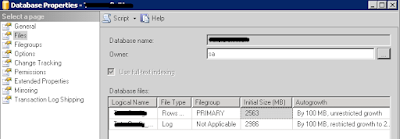
1.right click on the database that you want to change the owner and go to “Properties” menu.
2.In the properties window, go to menu “Select a page -> Files”. Search or type the new owner.
2.In the properties window, go to menu “Select a page -> Files”. Search or type the new owner.

Replication Log Reader Agent back to normal 恢復正常

2018年4月25日 星期三
Guideline for SQL Server configuration, installation and database creation
Guideline for SQL Server configuration, installation and database creation
2018年4月24日 星期二
SQL Server Reporting Services failed to start (Reporting Services啟動失敗)
SQL Server Reporting Services failed to start
(Reporting Services啟動失敗)

(Reporting Services啟動失敗)
Problem 問題:
The SQL Server Reporting Services (MSSQLSERVER) service failed to start due to the following error:
The service did not respond to the start or control request in a timely fashion.

Resolution 解決方法:
有三種解決方法,以下是我常用的一種
To increase the default service time-out, follow these steps:
- Click Start, click Run, type regedit in the Open box, and then click OK.
- Locate and then select the following registry subkey:
- HKEY_LOCAL_MACHINE\SYSTEM\CurrentControlSet\Control
- Right-click Control, point to New, and then click DWORD.
- In the New Value box, type ServicesPipeTimeout, and then press Enter.
- Right-click ServicesPipeTimeout, and then click Modify.
- Click Decimal, type the number of milliseconds that you want to wait until the service times out, and then click OK.
- For example, to wait 60 seconds before the service times out, type 60000.
- On the File menu, click Exit, and then restart the computer.
其他解決方法請參考以下連結文件
You cannot start SQL Server Reporting Services after you apply the update that is discussed in KB 2677070
Reporting Services service doesn’t start after the installation of MS12-070 security patch
2018年4月20日 星期五
Cluster service verification failed 叢集服務驗證失敗
Cluster service verification failed
叢集服務驗證失敗
Cause:


叢集服務驗證失敗
Cause:
如果在Windows 2012 R2 failover cluster上安裝SQL Server 2008 R2 cluster將會遇到此錯誤
Rule "Cluster service verification" failed.

Resolution: 解決方法
事先啟用 Failover Cluster Automation Server功能
Using SQL Server in Windows 8 and later versions of Windows operating system

To resolve this issue, do one of the following:
- Enable the Failover Cluster Automation Server feature on each node by using Server Manager. In Server Manager, expand Remote Server Administration Tools, expand Feature Administration Tools, expand Failover Clustering Tools, and then click to select Failover Cluster Automation Server. (The screen shot for this step follows.)
訂閱:
文章 (Atom)
-
SQL Server Enterprise 與 Standard 基本差異比較如下 : SQL Server Enterprise Edition SQL Server Standard Edition ...
-
Oracle version support matrix Oracle Release 19 Oracle Database Client Software Requirements https://docs.oracle.com/en/database/oracle/orac...
-
 1.安裝了Oracle Client,就可以用Oracle Net Manager工具來設定TNS連線設定(Tnsnames.ora) Oracle Client 18.3 Installation 安裝Oracle Client 18.3 2.啟動Oracle Ne...
